Warung Bebas

Rabu, 25 Januari 2012

Update to Top Search Queries Data

Recent Post by Google

Starting today, we’re updating our Top Search Queries feature to make it better match expectations about search engine rankings. Previously we reported the average position of all URLs from your site for a given query. As of today, we’ll instead average only the top position that a URL from your site appeared in.

An example
Let’s say Nick searched for [bacon] and URLs from your site appeared in positions 3, 6, and 12. Jane also searched for [bacon] and URLs from your site appeared in positions 5 and 9. Previously, we would have averaged all these positions together and shown an Average Position of 7. Going forward, we’ll only average the highest position your site appeared in for each search (3 for Nick’s search and 5 for Jane’s search), for an Average Position of 4.

We anticipate that this new method of calculation will more accurately match your expectations about how a link's position in Google Search results should be reported.

How will this affect my Top Search Queries data?
This change will affect your Top Search Queries data going forward. Historical data will not change. Note that the change in calculation means that the Average Position metric will usually stay the same or decrease, as we will no longer be averaging in lower-ranking URLs.

Check out the updated Top Search Queries data in the Your site on the web section of Webmaster Tools. And remember, you can also download Top Search Queries data programmatically!

Kamis, 19 Januari 2012

How to Auto-Forward Gmail Messages in Bulk

navjot singh

Gmail offers an easy mail forwarding option that lets you auto-forward incoming messages to another email address. You define a rule (or filter) and any incoming mail that matches the filter is automatically forwarded to another address.

There are however some limitations in Gmail’s auto-forwarding feature:

1. You cannot auto-forward old emails. For instance, if you have a bunch of old emails that you would like to send to your EverNote or Instapaper account for archiving, you’ll have to manually forward them one-by-one as auto-forward only works for new incoming emails.

2. You cannot auto-forward to a non-verified email address. When you set up auto-forward in Gmail, it sends a verification message to the other email address before you can forward messages to that account.
Gmail Auto-Forward with Google Docs

If you would like to auto-forward Gmail messages (including the older emails) to another email address in bulk, or if you would like to forward them to another address without confirming, Google Docs can help you overcome those limitations very easily.

The trick is simple. You set up a trigger in Google Docs that watches some of the labels in your Gmail Inbox and as soon as it finds a message, it auto-forwards it to a designated email address. You just have to set it once and it then runs in the background without requiring any manual input.

Gmail Auto Forward
Setting up Mail Forwarding – Step by Step

Create a copy of this Google Sheet in your Google Docs account and fill the columns A and B. You should put valid Gmail Label Names in column A and the corresponding auto-forward email address in column B.

Go to Tools –> Script Editor –> Triggers –> Current Script’s Trigger and Add a new Trigger. Set the Event as Time-Driven and choose either Minutes or Hours for the duration. If you want near-instant mail forwarding, set the timer to Every Minute.

Since you are running this Google Docs sheet for the first time, you’ll have to authorize it to access your Gmail account. Just follow the authorization prompts to grant Google Docs access to your Gmail.

That’s it. You can close your Google Docs sheet and it will magically forward your Gmail messages that are in particular labels. Once the message has been forwarded, the label will be removed automatically.

Sabtu, 14 Januari 2012

Better page titles in search results


navjot singh
Page titles are an important part of our search results: they’re the first line of each result and they’re the actual links our searchers click to reach websites. Our advice to webmasters has always been to write unique, descriptive page titles (and meta descriptions for the snippets) to describe to searchers what the page is about.
We use many signals to decide which title to show to users, primarily the tag if the webmaster specified one. But for some pages, a single title might not be the best one to show for all queries, and so we have algorithms that generate alternative titles to make it easier for our users to recognize relevant pages. Our testing has shown that these alternative titles are generally more relevant to the query and can substantially improve the clickthrough rate to the result, helping both our searchers and webmasters. About half of the time, this is the reason we show an alternative title.

Other times, alternative titles are displayed for pages that have no title or a non-descriptive title specified by the webmaster in the HTML. For example, a title using simply the word "Home" is not really indicative of what the page is about. Another common issue we see is when a webmaster uses the same title on almost all of a website’s pages, sometimes exactly duplicating it and sometimes using only minor variations.

Lastly, we also try to replace unnecessarily long or hard-to-read titles with more concise and descriptive alternatives.
For more information about how you can write better titles and meta descriptions, and to learn more about the signals we use to generate alternative titles, we've recently updated the Help Center article on this topic. Also, we try to notify webmasters when we discover titles that can be improved on their websites through the HTML Suggestions feature in Webmaster Tools; you can find this feature in the Diagnostics section of the menu on the left hand side.

Essential SEO Tips & Techniques


navjot singh
1.. Commit yourself to the process. SEO isn’t a one-time event. Search engine algorithms change regularly, so the tactics that worked last year may not work this year. SEO requires a long-term outlook and commitment.
2. Be patient. SEO isn’t about instant gratification. Results often take months to see, and this is especially true the smaller you are, and the newer you are to doing business online.
3. Ask a lot of questions when hiring an SEO company. It’s your job to know what kind of tactics the company uses. Ask for specifics. Ask if there are any risks involved. Then get online yourself and do your own research—about the company, about the tactics they discussed, and so forth.

4. Become a student of SEO. If you’re taking the do-it-yourself route, you’ll have to become a student of SEO and learn as much as you can. Luckily for you, there are plenty of great web resources (like Search Engine Land) and several terrific books you can read. (Yes, actual printed books!) See our What Is SEO page for a variety of articles, books and resources.
5. Have web analytics in place at the start. You should have clearly defined goals for your SEO efforts, and you’ll need web analytics software in place so you can track what’s working and what’s not.
6. Build a great web site. I’m sure you want to show up on the first page of results. Ask yourself, “Is my site really one of the 10 best sites in the world on this topic?” Be honest. If it’s not, make it better.
7. Include a site map page. Spiders can’t index pages that can’t be crawled. A site map will help spiders find all the important pages on your site, and help the spider understand your site’s hierarchy. This is especially helpful if your site has a hard-to-crawl navigation menu. If your site is large, make several site map pages. Keep each one to less than 100 links. I tell clients 75 is the max to be safe.
8. Make SEO-friendly URLs. Use keywords in your URLs and file names, such as yourdomain.com/red-widgets.html. Don’t overdo it, though. A file with 3+ hyphens tends to look spammy and users may be hesitant to click on it. Related bonus tip: Use hyphens in URLs and file names, not underscores. Hyphens are treated as a “space,” while underscores are not.
9. Do keyword research at the start of the project. If you’re on a tight budget, use the free versions of Keyword Discovery or WordTracker, both of which also have more powerful paid versions. Ignore the numbers these tools show; what’s important is the relative volume of one keyword to another. Another good free tool is Google’s AdWords Keyword Tool, which doesn’t show exact numbers.
10. Open up a PPC account. Whether it’s Google’s AdWords, Microsoft adCenter or something else, this is a great way to get actual search volume for your keywords. Yes, it costs money, but if you have the budget it’s worth the investment. It’s also the solution if you didn’t like the “Be patient” suggestion above and are looking for instant visibility.
11. Use a unique and relevant title and meta description on every page. The page title is the single most important on-page SEO factor. It’s rare to rank highly for a primary term (2-3 words) without that term being part of the page title. The meta description tag won’t help you rank, but it will often appear as the text snippet below your listing, so it should include the relevant keyword(s) and be written so as to encourage searchers to click on your listing. Related bonus tip: You can ignore the Keywords meta tag, as no major search engine today supports it.
12. Write for users first. Google, Yahoo, etc., have pretty powerful bots crawling the web, but to my knowledge these bots have never bought anything online, signed up for a newsletter, or picked up the phone to call about your services. Humans do those things, so write your page copy with humans in mind. Yes, you need keywords in the text, but don’t stuff each page like a Thanksgiving turkey. Keep it readable.
13. Create great, unique content. This is important for everyone, but it’s a particular challenge for online retailers. If you’re selling the same widget that 50 other retailers are selling, and everyone is using the boilerplate descriptions from the manufacturer, this is a great opportunity. Write your own product descriptions, using the keyword research you did earlier (see #9 above) to target actual words searchers use, and make product pages that blow the competition away. Plus, retailer or not, great content is a great way to get inbound links.
14. Use your keywords as anchor text when linking internally. Anchor text helps tells spiders what the linked-to page is about. Links that say “click here” do nothing for your search engine visibility.
15. Build links intelligently. Begin with foundational links like trusted directories. (Yahoo and DMOZ are often cited as examples, but don’t waste time worrying about DMOZ submission. Submit it and forget it.) Seek links from authority sites in your industry. If local search matters to you (more on that coming up), seek links from trusted sites in your geographic area — the Chamber of Commerce, local business directories, etc. Analyze the inbound links to your competitors to find links you can acquire, too. Create great content on a consistent basis and use social media to build awareness and links. (A blog is great for this; see below.)
16. Use press releases wisely. Developing a relationship with media covering your industry or your local region can be a great source of exposure, including getting links from trusted media web sites. Distributing releases online can be an effective link building tactic, and opens the door for exposure in news search sites. Related bonus tip: Only issue a release when you have something newsworthy to report. Don’t waste journalists’ time.
17. Start a blog and participate with other related blogs. Search engines, Google especially, love blogs for the fresh content and highly-structured data. Beyond that, there’s no better way to join the conversations that are already taking place about your industry and/or company. Reading and commenting on other blogs can also increase your exposure and help you acquire new links. Related bonus tip: Put your blog at yourdomain.com/blog so your main domain gets the benefit of any links to your blog posts. If that’s not possible, use blog.yourdomain.com.
18. Use social media marketing wisely. If your business has a visual element, join the appropriate communities on Flickr and post high-quality photos there.

Jumat, 13 Januari 2012

Google Announces “Megasitelinks,” Image Search Improvements & Better Byline Dates

navjot singh
Megasitelinks (Localized, Too)

By Navjot Singh That’s Google’s internal project name for what the post say is an algorithmic improvement for selecting sitelinks. Google’s post doesn’t offer much color about why the name “Megasitelinks” was chosen for this update, but it does share one interesting new implementation: localized sitelinks.
“…we may show sitelinks specific to your metropolitan region, which you can control with your location setting.”
Google has been making a fair amount of updates to its Sitelinks in recent months. We’ve noticed them showing up not only on home pages, but also more frequently on sub-pages. Sitelinks have also expanded to include Google+ data in certain cases, as we reported back in November. And last summer there was the addition of the 12-pack of sitelinks.
I’ve yet to find a query that produces localized sitelinks, but not for lack of trying. (Feel free to leave a comment below if you’ve found/seen one.)

Image Search Improvements

There are two items related to Google Image Search in today’s post:

1. Improved quality signals — Google says its image search algorithm is not only looking for relevant images, but also “linking to the highest quality source pages.” Landing page quality is now an algorithmic signal for image search.
2. Spam detection — Google says it’s applying the spam detection algorithm from its main search results into Image Search.

Byline Dates

Google says it’s now showing “more accurate byline dates” after making some changes to how it determines what date to assign to a web document. There’s no extra detail provided — so I can only speculate that this is part of the change — but I just noticed last night on a search for “blog directories” that Google was showing two old blog posts but with their most recent “updated” dates:
google-byline-dates
Both of those are at least several years old, but show 2011 as the byline date.

Other Google Changes

There are several other changes mentioned in Google’s blog post:
  • The company says it’s doing a better job of determining where web documents are from, so that its country-restricted search results are more accurate.
  • Google says it’s improved what it calls “soft 404″ detection, which is when websites/servers are configured to send the wrong response code to Google’s spiders.
  • There are two changes mentioned on the topic of related queries, including one that makes the algorithm “more conservative and less likely to introduce results without query words.”
You can see read Google’s blog post for the full list of 30 changes that were made in December.

Google’s Results Get More Personal With “Search Plus Your World

navjot singh
By Navjot Singh
Google’s search results are undergoing their most radical transformation ever, as a new “Search Plus Your World” format begins rolling out today. It finds both content that’s been shared with you privately along with matches from the public web, all mixed into a single set of listings.
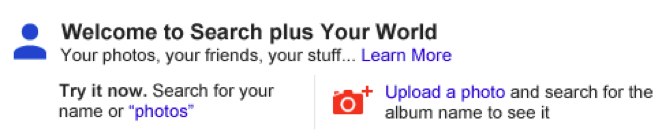
The change is live now, though not everyone will see it until it fully launches over the next few days. It’s only for those signed-in to Google.com and searching in English. You’ll know when it happens, because Google will alert you with a message like this above your search results:

The new system will perhaps make life much easier for some people, allowing them to find both privately shared content from friends and family plus material from across the web through a single search, rather than having to search twice using two different systems.
However, Search Plus Your World may cause some privacy worries, as private content may appear as if it is exposed publicly (it is not). It might also cause concern by making private content more visible to friends and family than those sharing may have initially intended.
The new format and features will also likely cause Google to come under renewed fire that it is leveraging its search engine to favor its own content and crowd out competitors.
 

SEO TIPS Copyright © 2012 Fast Loading -- Powered by Blogger